Goldberg Variations: Aria was written by Johann Sebastian Bach, first published in 1741 as the opening movement of his Goldberg Variations, BWV 988. The Aria is a serene sarabande for two-manual harpsichord whose bass line serves as the basis for thirty ensuing variations in this monumental keyboard cycle. The Goldberg Variations: Aria has become one of Bach’s most iconic keyboard pieces and is frequently performed both on its own and as the gateway to the complete set.
Explore our 2 arrangements of Goldberg Variations: Aria Sheet Music by Bach Johann Sebastian for Piano. Compare 2 arrangements across Easy - Intermediate, preview each version and choose the score that best suits your instrument and playing level.
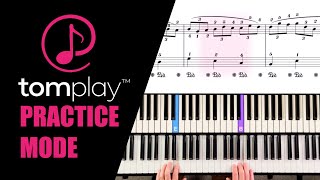
Play Goldberg Variations: Aria and over 100,000 other scores with Tomplay Interactive Sheet Music. Follow the score as it scrolls automatically, play along with professional backing tracks, get real-time feedback on the notes you play, adjust the tempo, loop difficult passages, add annotations and print your score — on all your devices. Get free unlimited access for 14 days
All 2 of Goldberg Variations: Aria, play 100,000 more Interactive Sheet Music Titles - free for 14 days
Explore 2 Piano arrangements of Goldberg Variations: Aria, ranging from Easy to Intermediate. 2 include fingering annotations. arrangements have right and left hands recorded separately, so you can practise one hand accompanied by the other.
You can play Goldberg Variations: Aria Sheet music on 1 instruments, including Piano.
At Tomplay, we have adapted Goldberg Variations: Aria Sheet music in 2 levels, from Easy to Intermediate.
Yes, Goldberg Variations: Aria Interactive Sheet Music on Tomplay includes a backing track for you to play along with. You can mute your instrument and play along as part of a duet, trio, or quartet, with an orchestra, or with a band.
Tomplay’s Goldberg Variations: Aria Interactive Sheet Music includes a range of features to make learning and practising easier. You can adjust the tempo, loop difficult passages, add annotations, record yourself, use the Visual Guide, and benefit from real-time note recognition to get instant feedback as you play.

Automatically scrolls in sync with the music.
Practise each hand separately.
Backing tracks recorded by professional musicians.
Slow down or speed up the music tempo.
Up to 8 levels from beginner to advanced.
Practise specific passages in loops.
Learn step by step with short videos and guided exercises
Record and listen back to your performance.
Visualise the right notes and fingerings in real time.
Learn faster with Tomplay's official fingering.
The score advances only when you play the right note.
Add your own personal annotations.
The app listens to you and turns the pages.
Print up to 48 scores annually (unavailable during trial).
Display the name of every note — perfect for beginners.

 2 Million users




You have reached the maximum number of score downloads allowed during the free trial.
Skip the free trial and start the 1-year subscription now.